By Wu Peng, Senior Process Instrumentation Engineer · Last reviewed October 19, 2026
P&ID instrumentation symbols follow ANSI/ISA‑5.1. Each instrument is a bubble with a tag inside: the letters give the measured variable and the function, and the number gives the loop. The outline of the bubble shows whether it is a physical device or a function inside a control system. A bar across it shows where it is mounted, and the line style between bubbles shows the signal type.
Customers send us P&IDs with their inquiries, and each tag has to become a priced instrument. The tag tells us what the device does and where it is mounted; the range, materials and output come from the datasheet.
Printable version. Download the P&ID instrumentation symbols quick reference (PDF, two pages, 30 KB): letter table, bubble shapes, location bars, signal lines, common tags and the level loop below.
Contents
- Reading a tag
- Bubble shapes
- Signal lines
- Variable, not principle
- Common instrument tags
- A level loop
- From tag to datasheet
- Common misreads
- FAQ
Reading a tag
Read a tag from left to right. The first letter is the measured or initiating variable, such as flow or a hand switch, and an optional modifier can follow it, such as D for differential or Q for totalize. The next letters are functions. H or L at the end gives the direction of an alarm or trip, and HH or LL marks a second level.
The number is the loop number. Every device in one loop shares it, so FE‑101, FT‑101, FIC‑101 and FV‑101 are the flow element, transmitter, controller and valve of loop 101. A suffix such as PT‑101A and PT‑101B separates two identical devices on the same loop.
| Letter | As first letter | As succeeding letter |
|---|---|---|
| A | Analysis | Alarm |
| C | User’s choice | Control |
| D | User’s choice; as modifier, differential | Deviation |
| E | Voltage | Sensing element |
| F | Flow; as modifier, ratio | – |
| G | User’s choice | Glass, gauge, viewing device |
| H | Hand (manual) | High |
| I | Current | Indicate |
| K | Time, schedule | Control station |
| L | Level | Pilot light; low |
| P | Pressure, vacuum | Test point |
| Q | Quantity; as modifier, totalize | – |
| R | Radiation | Record |
| S | Speed, frequency; as modifier, safety | Switch |
| T | Temperature | Transmit |
| U | Multivariable | Multifunction |
| V | Vibration | Valve, damper, louver |
| W | Weight, force | Well, probe |
| Y | Event, state, presence | Relay, compute, convert |
| Z | Position, dimension | Driver, actuator |
Condensed from ANSI/ISA‑5.1. Letters B, J, M, N, O and X are left out. A “user’s choice” letter is defined on the project legend sheet.
The current edition is ANSI/ISA‑5.1‑2024, retitled Instrumentation and Control Symbols and Identification. ISA added symbols for newer automation technology and a symbol table for loop diagrams, and issued its identification and graphic symbol guidelines separately as ISA‑TR5.1.02 and ISA‑TR5.1.03. The published summaries of the revision describe no change to the letter code, so a drawing made to the 2009 edition reads the same way.
Bubble shapes
The outline of the bubble tells you what kind of system carries the function. A plain circle is a physical device in the plant; the other three shapes are functions configured in software.
| Shape | Meaning |
|---|---|
| Circle | Discrete instrument: a transmitter, gauge or switch |
| Circle in a square | Shared display and control in the basic process control system (BPCS), usually a distributed control system (DCS) |
| Hexagon | Function in a computer system outside the BPCS |
| Diamond in a square | Safety instrumented system (SIS) or an alternate control system |
Older drawings tied these shapes to the control platform: circle in a square meant a DCS and diamond in a square meant a programmable logic controller (PLC). The current definitions describe the function instead, whatever system carries it.
A horizontal bar through the bubble gives the location. No bar means field mounted. A single solid bar means the main control room panel or console, and a double solid bar means a local panel. A dashed bar means the rear of a panel or a cabinet, where the operator does not normally reach.
The project legend sheet overrides all of this. ISA‑5.1 leaves several letters to the user, and owners add their own conventions for valves and equipment, so read the legend before the first process sheet. Projects outside North America may draw to ISO 10628‑2 instead, which defines its own graphical symbols.
Signal lines
Lines between bubbles show what travels along them. A thick solid line is process piping, and a thin solid line connects an instrument to the process, such as the impulse line, the small-bore tubing from a pressure tap to a transmitter.
| Line style | Signal |
|---|---|
| Thin solid | Process connection or instrument supply |
| Dashed | Electrical, such as 4‑20 mA |
| Double slashes | Pneumatic, such as 3‑15 psi |
| L marks | Hydraulic |
| X marks | Capillary tube of a filled system |
| Small circles | Data link between system functions |
ISA‑5.1 also defines lines for mechanical links and for guided and unguided electromagnetic or sonic signals. A dashed line does not tell you whether the 4‑20 mA current loop also carries a digital signal. Look for a note beside the line, or check the datasheet for the protocol. Our HART protocol guide covers how a digital signal shares the same pair of wires.
Variable, not principle
The first letter names the variable being measured, not the physical principle inside the device. A buyer who misses this rule looks in the wrong product group, because one model of differential pressure transmitter can carry three different tags on the same drawing.
| Installed | Tag | Why |
|---|---|---|
| Across an orifice plate | FT | Flow is inferred from the pressure drop |
| On a tank, high side at the bottom | LT | Level is inferred from the liquid head |
| Across a filter | PDT | The pressure difference is the variable |
The same rule covers the final element. A control valve moved by a pressure controller is PV, and one moved by a level controller is LV, even though both valves change the flow through them. The valve takes the first letter of its loop.
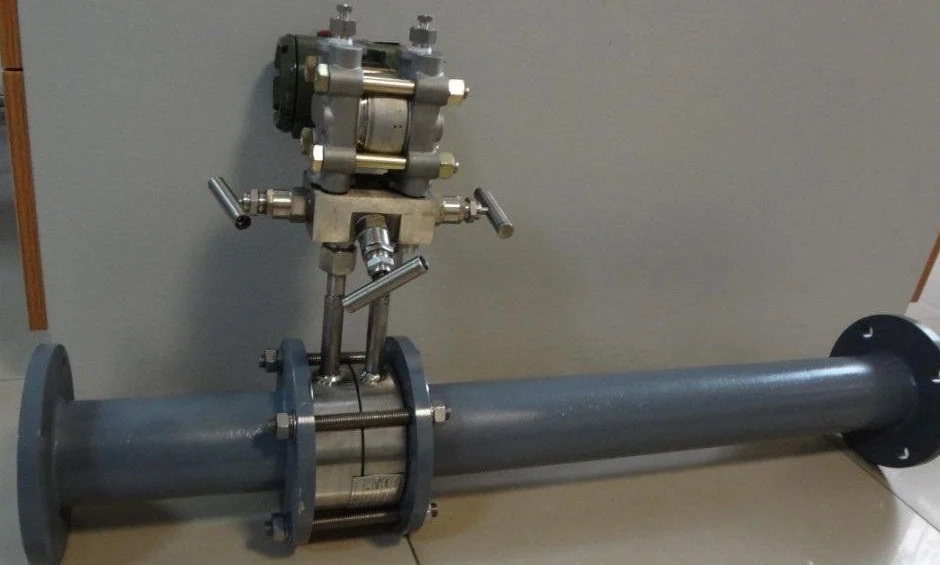
For an order, the tag gives the variable and the datasheet gives the device. A tank tagged LT can be served by a DP level transmitter, a radar or a submersible sensor. When it is a DP unit, its range is set in pressure units from the liquid density; our guide to setting the lower and upper range values works through the numbers.
Common instrument tags
These instrument symbols in P&ID drawings come up regularly on the inquiries we receive. The right column is the first question we ask about each tag. Flow switches (FSL, FSH) have their own symbol and wiring guide, and the FQ tags are explained in flow totalizer vs flow meter.
| Tag | Meaning | We ask |
|---|---|---|
| FE, FT | Flow element, flow transmitter | Meter type, fluid, flow range |
| FQI | Flow totalizing indicator | Units of the total |
| PT, PI | Pressure transmitter, pressure gauge | Range, gauge or absolute |
| PDT | Differential pressure transmitter | Differential range, static pressure |
| LT, LG | Level transmitter, level gauge glass | Tank height, density, open or closed |
| LSHH | Level switch, high-high | Whether it belongs to the SIS |
| TE, TW, TT | Temperature element, thermowell, transmitter | Range, insertion length |
| AT | Analyzer transmitter | What is analyzed, sample conditions |
A flow transmitter symbol is a circle tagged FT, drawn next to its flow element (FE) on the line. Many legends add a small in-line symbol for the element type, such as an orifice plate, a venturi, or a magnetic, vortex, Coriolis or ultrasonic meter. Level instruments usually have no such in-line symbol, so the level technology is given in a note or on the datasheet.
A compact meter with built-in electronics often carries both tags: FE for the sensor in the line and FT for the transmitter. It is still one item on the order.
A level loop
The drawing below is a simple level control loop of the kind found on a buffer tank. Every device carries the loop number 101 and the first letter L, because the controlled variable is level.
LT‑101 is a plain circle with no bar: a field transmitter, joined to the tank by a thin process line. It sends 4‑20 mA on a dashed line to LIC‑101, a circle in a square with one solid bar. That is a controller configured in the DCS and shown on the main console. LIC‑101 drives LY‑101, a field-mounted current-to-pneumatic (I/P) converter, and the double-slash line carries air to the actuator of LV‑101.
A high-high level switch wired to a safety system usually has its own loop number, for example LSHH‑102, with its logic drawn as a diamond in a square. The separate loop number also shows on the drawing that the trip does not depend on LIC‑101.
From tag to datasheet
A P&ID shows what each instrument does and where it connects. It may carry a line size, a set point or an alarm limit, but it does not replace the datasheet. The range, fluid properties, materials and electrical details sit in the instrument index (one row per tag) and in one datasheet per tag. ISA‑TR20.00.01 provides standard specification forms for those datasheets.
When a P&ID is the only document in an inquiry, we ask for five points before we quote:
- Fluid, with operating and design pressure and temperature
- Measuring range and engineering units
- Line size or tank dimensions, and the process connection
- Wetted materials and the hazardous-location rating (Class and Division, or Zone)
- Output and power, for example 4‑20 mA with HART on 24 V DC
Application example
Trading company, Gulf region. A reseller asked us for a V-cone flow meter and sent the P&ID as the basis for selection, with the meter shown on a process fluid line. Selection started from the drawing, and the inquiry is still in follow-up, so there is no field result to report yet.
Treat the line size on the drawing as a starting point. A V‑cone or an orifice plate flow meter is sized from the flow range and fluid data, which set the beta ratio (the size of the restriction relative to the pipe) and the differential pressure at full flow. The P&ID also shows where the meter sits relative to bends and valves, which sets the straight run; see upstream and downstream in piping.
Common misreads
- PT read as pressure and temperature. Here T is the function transmit, so PT is a pressure transmitter. A device measuring both is drawn as two touching bubbles or tagged with U for multivariable.
- PCV taken for PV. Under ISA‑5.1 a PCV is a self-actuated regulator with no separate controller, and a PV is a control valve moved by a controller such as PIC. Some owners use PCV for any pressure control valve, so check the legend.
- TE and TW priced as one item. TW is the thermowell, a pressure-retaining part checked for stress and vibration, typically to ASME PTC 19.3 TW. TE is the sensor that goes inside it, and the two can be ordered separately.
- Loop number taken for the line number. Line numbers carry size, service, sequence number and piping class and run along the pipe. Loop numbers sit inside bubbles.
FAQ
What does P&ID stand for?
P&ID stands for piping and instrumentation diagram; some companies write process and instrumentation diagram. It shows the process equipment, the numbered piping and valves, and every instrument and control function with its ISA tag. It is the base document for the instrument index, the datasheets and hazard and operability (HAZOP) reviews. It has nothing to do with PID (proportional-integral-derivative) control, although P&ID is sometimes written PID.
Is a P&ID a schematic?
Yes. A P&ID is a schematic, not a scale drawing: it shows how equipment, piping and instruments connect and how they are controlled, but not their physical position or pipe lengths. Plot plans and piping isometrics carry the dimensions. A process flow diagram (PFD) is a simpler schematic of the main process only.
How do I read a P&ID?
Start with the legend sheet, which defines the symbols and any user-chosen letters. Then follow the main process line from feed to product, noting the equipment and line numbers. For each instrument, read the tag letters and loop number, check the bubble shape and bar, and trace its signal line to the device it acts on.
How do I interpret a P&ID code?
Split the tag into letters and number. The first letter is the variable (F flow, L level, P pressure, T temperature), any modifier comes next, and the remaining letters are functions (I indicate, T transmit, C control, S switch). The number is the loop. PDIC-205 is a differential pressure indicating controller in loop 205.
What is instrumentation in P&ID?
Instrumentation is the “I” in P&ID: every sensor, transmitter, gauge, switch, controller and control valve, plus the signal lines between them. Each one is drawn as a tagged bubble to ISA-5.1, so the drawing shows what is measured, where it is read and what acts on it.
Request a quote
Send the P&ID with the tags you need priced, and add the instrument datasheets if they exist. If they do not, the five points above are enough to start. Tell us the application and we configure one unit, not a shelf part. Reach our application engineers or use the form below.
Written and technically reviewed by Wu Peng and the Instranova engineering team.