Home › Pressure Switches › Manual Reset Pressure Switch PC-200
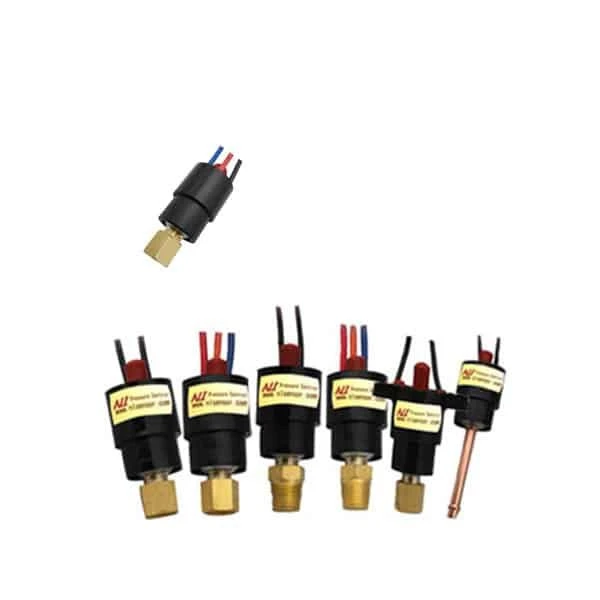
Manual Reset Pressure Switch PC-200
A compact mechanical pressure switch that latches when it trips and stays latched until someone presses reset. That lockout makes it a safety device: after an over-pressure event, the machine cannot restart on its own.
- Working range: 30 to 800 psi
- Reset range: 10 to 700 psi
- Deadband: ± 3 to 30 psi
- Reset: manual (latches after a trip)
- Contact: micro-switch, 220 VAC 3 A
- Life: over 100,000 cycles
On a compressor or a hydraulic pack, a normal pressure switch resets itself the moment pressure drops, so the fault that tripped it can repeat on the next cycle. The PC-200 does the opposite: once it trips, it stays open until an operator checks the system and presses the reset. That single feature turns it from a control switch into a safety interlock.
Overview
The PC-200 is a compact mechanical pressure switch with a manual-reset mechanism. It uses the same stainless bellows and snap-action micro-switch as the rest of the PC series, but adds a latch: when the pressure crosses the set point, the contact changes state and holds there until the reset button is pressed. It is built for over-pressure and safety cutoffs on compressors, pumps, and pressure vessels, and is rated for over 100,000 cycles.
If you want a switch that resets itself when pressure returns to normal, the miniature PC-100 is the auto-reset version. The PC-200 is the choice where a trip must be acknowledged before the system can run again.
Working principle
Pressure acts on a stainless bellows. When it rises past the set point, the bellows trips a snap-action micro-switch, which changes the contact. A latch then holds the switch in the tripped state even after pressure falls back below the reset point, so the circuit stays broken. Pressing the manual reset releases the latch and returns the contact to its normal state, ready for the next cycle. Until that happens, the controlled equipment cannot restart.
Technical specifications
Representative specifications; confirm the exact build per datasheet.
| Parameter | Specification |
|---|---|
| Output | Switch signal (dry contact) |
| Working pressure range | 30 to 800 psi |
| Reset pressure range | 10 to 700 psi |
| Deadband | ± 3 to 30 psi |
| Reset | Manual (latches after a trip) |
| Contact rating | 220 VAC, 50/60 Hz, 3 A |
| Ambient temperature | -40 to +85 °C |
| Medium temperature | -40 to +125 °C |
| Working life | Over 100,000 cycles |
| Pressure element | Stainless steel bellows |
Output and contacts
The PC-200 gives a dry switch contact rated 220 VAC at 3 A, so it switches a contactor coil, a solenoid, or an alarm directly. Order it normally open (A), normally closed (B), or as a changeover (C). For a safety cutoff, wire the normally closed contact in series with the run circuit: a trip opens it and the latch keeps it open, so the equipment stays off until the operator presses reset and confirms the fault is cleared.
Applications
The PC-200 suits jobs where a trip must not clear itself:
- Over-pressure cutoff on air compressors and pumps
- Safety interlock on hydraulic power packs
- Pressure-vessel and boiler high-limit protection
- Machinery that must be checked before restart after a fault
FAQ
What is a pressure switch used for?
A pressure switch opens or closes a contact when pressure reaches a set point, to start or stop equipment, raise an alarm, or interlock a machine. The manual-reset PC-200 is built for the safety side of that job: once it trips, the contact stays latched until a person presses the reset, so a pump or burner cannot restart on its own after a pressure fault. That lockout behaviour is what you want for protective trips rather than routine on-off control.
How do you tell if a pressure switch is normally open or closed?
You read it from the wiring and the trip logic: normally open (NO) contacts stay open until pressure reaches the set point, normally closed (NC) stay closed until then. For a safety switch like the PC-200 the contact is usually wired so that a trip, or a loss of power, drops the circuit to the safe state. After a manual-reset trip the contact holds that state until you press reset, so check both the contact form and the reset action when you commission it.
What psi should my pressure switch be set at?
Set it for the protection you need, not a fixed figure. Choose the trip point below the safe limit of the equipment with enough margin that normal swings do not trip it, and remember the PC-200 latches: once it acts, it stays tripped until reset, so set it where you genuinely want the process to stop and be checked. Confirm the set point against a test gauge during commissioning.
Request a quote
Tell us five things and we configure one unit, not a shelf part:
- Trip set point and the deadband you need
- Pressure range and the medium (liquid or gas)
- Contact action (A, B, or C) and what it switches
- Connection (thread or air tube)
- Reset access (panel-front or on the switch)
Ordering example: PC-200, manual reset, normally closed (B), trip at 600 psi, 220 VAC 3 A contact.
Tell us the application and we configure one unit, not a shelf part. Building a safety cutoff we have not listed? Reach our application engineers.